Hi sensible programmer muskmelon!

: Clippy, bash / zsh commands, CSS Color

wp-cli

Install

see: https://www.cyon.ch/blog/Mit-WP-CLI-WordPress-auf-der-Kommandozeile-verwalte

Troubleshooting section at the bottom of the page

Commands

  • wp plugin update [options below]
    • <plugin-name(s)>
    • --all : updates all plugins
    • --dry-run : Preview which plugins would be updated.
    • --exclude=<pluin-name(s)>
  • wp core check-update and wp core update
  • wp option get blog_public
    • checks if blog is search engine crawlable, returns 1 or 0.
    • append 1 to enable, 0 to disable
  • wp config get
    • reads out wp config file
  • wp core version
    • Returns current version number of WP install
  • wp core verify-checksums
    • Verify md5 checksums against current version on WordPress.org
    • --version=4.9.9 : Check for specific version
  • wp search-replace '//temporarydomain.com' '//finaldomain.com'
    • Search + replaces database entries
    • Always use --dry-run first to prevent f*#©<ups

See: Handbook

Aliases

Install wp-cli locally, then add the aliases as follows to the wp-cli/config.yml

@aliasname
    ssh: user@server/path/to/wp
@otheralias
    ssh:otheru@others/path/to/wp
@aliasgroup
    - @aliasname
    - @otheralias

Usage: wp <aliasname|group|@all> <command>.

Examples:

  • wp @otheralias core check-update
  • wp @all option get blog_public

See: WP-Cli Commands Handbook | Jason Yingling

wp-cli + Alfred App

Alfred app:

  • Create a workflow with an external trigger
  • Copy the sample code
  • escape the quotes (\")

Terminal Command Action

v=$(wp @nekos core version);
/usr/bin/osascript -e "tell application \"Alfred 3\" to run trigger \"myTrigger\" in workflow \"ch.lnrz.wphelpers\" with argument \"$v\""
  • v=$(wp @nekos core version); runs the comands and stores it to the variable v
  • /usr/bin/osascript -e "tell ... executes apple script which calls the external trigger myTrigger of the workflow ch.lnrz.wphelperswith the argument of the variable v
    • Note: the actionscript command must be wrapped in quotes (thus the escaping beforhand)

Trouble shooting

Tab completition in zsh

Symptom: comand nof found: complete

For Tab completion in zsh use the following lines in the .zshrc or the sourced .bash_profile [s]:

autoload bashcompinit
bashcompinit
source ~/.wp-cli/wp-completion.bash

Trouble with remote $PATH

Symptom:command not found: wp

See: Making WP-CLI accessible on a remote server (WP Handbook)
=> third solution (before_ssh) worked for me (dont forget the <?php ... ?> Tags in the included file)


Disabling & changing default Gutenberg features

Only allow certain types of blocks (aka ‚remove‘ blocks)

👉  allowed_block_types hook

add_filter( 'allowed_block_types', 'slug_allowed_block_types' );
 
function slug_allowed_block_types( $allowed_blocks ) {
 
	return array(
		'core/image',
		'core/paragraph',
		'core/heading',
		'core/list'
	);
 
}

Takes $post as a second parameter, so the allowed blocks can be set on a per post-type basis

add_filter( 'allowed_block_types', 'slug_allowed_block_types', 10, 2 );
 
function slug_allowed_block_types( $allowed_blocks, $post ) {
 
	$allowed_blocks = array(
		'core/image',
		// ...
	);

 
	if( $post->post_type === 'page' ) {
		$allowed_blocks[] = 'core/shortcode';
	}
 
	return $allowed_blocks;
 
}

Note:

  • block list is empty on default
  • allowed blocks per template via if( 'page-template-name.php' == get_page_template_slug( $post ){ ... } but is only aplied when page with template already has been saved.
  • for block slug see Misha Rudrastyhs collection

Source: Misha Rudrastyh: Removing Default Gutenberg Blocks

Disable default WP block styles

function slug_remove_gutenberg_default_styles() {
	if( !is_admin() ){
		wp_dequeue_style( 'wp-block-library');
	}
}
add_action( 'wp_print_styles', 'slug_remove_gutenberg_default_styles' );

(duplicate of Gutenberg notes entry)

Disable color palettes

// Disable color palette.
add_theme_support( 'editor-color-palette' );

// Disable color picker.
add_theme_support( 'disable-custom-colors' );

Note: As with all add_theme_support methods hook into after_setup_theme

Source: Theme Coder

Block Templates

Predefined blocks per post type.

function slug_add_template_to_page() {
	$post_type_object = get_post_type_object( 'page' );	
	
    $post_type_object->template = array(
        array( 'core/paragraph', array(
            'placeholder' => 'Add Description...',
		) ),
		array( 'core/image', array(
        ) ),
    );
    $post_type_object->template_lock = 'all';
}
add_action( 'init', 'slug_add_template_to_page' );
  • ->template-lock :
    • 'all' : prevents all block manipulation (changing order adding, removing)
    • 'insert' : prevents inserting or removing blocks but allows chaning the order

Block Templates

See also

Gutenberg Dev

Follwing along Zac Gordons Gutenberg Development Course.

Insert:

The Gutenbergs JS libraries

  • wp.element: Abstraction Layer on top of React and React Dom. Used for creating elements inside blocks.
  • wp.blocks: Components and functions for building blocks.
  • wp.components: Components that can be used for building interfaces within the editor (tooltips, buttons … )
  • wp.i18n: For translations, similar to the __() methods in php

All of these libs are accessible globaly (e.g. through the console or other scripts)
To access them within code, use something like

const { __ } = wp.i18n; // using deconstruction

Basic block architecture

Default roadmap:

  1. Enque block JS in main plugin/theme file [php]
  2. Register block using registerBlockType() [js]
  3. Opt. break up block code in components [js]
  4. Enque block css [php]

Enque block js + css

  • enque_block_edtior_assets: hook for enquing block js+css in the editor (not the frontend). Used to enque the main block js file, or editor-only styles.
  • enque_block_assets : hook to enque (mostly) css (and js) for both, the editor and the front endUser for main block styles. Use !is_admin()for front-end-only styles/scripts 

Building blocks

registerBlockType()

wp.blocks.registerBlockType(
  'plugin-name/block-name',
  {
    title: wp.i18n.__('Blocktitle', 'textdomain),
    description: '...',
    category: 'common',
    icon: 'wordpress-alt',
    keywords: [wp.i18n.__('Demo', 'textdomain)],
    supports: { html: false },
    attributes: {} ,
    edit: () => {},
    save: () => {}
  }
);

attributes

Which information to (re-)store and manipulate

attributes {
  message: {
    type: "array",
    source: "children",
    selector: ".classname-of-element"
  },
}

edit

Controls how the block is rendered (and updated) in the editor.
Usualy constists of a return method as well as a method that handles what hapens onChange (e.g. text editing). props ( React, anyone?) are passed on automatically from WP.

edit: props => {
  const {
    attributes: { message },
    className,
    setAttributes
  } = props;
  const onChangeMessage = message => {
    setAttributes({ message });
  };
  return {
    <div className={className}>
      <RichText
        tagName="div"
        multiline="p"
        placeholder={__("Type something ...", "textdomain")}
        onChange={onChangeMessage}
        value={message}
      />
    </div>
  }
}

save

How to save the post – for displaying on the front end and restoring for the editor.

save: props => {
  const {
    attributes: { message }
  } = props;
  return (
    <div>
      <div class="output-feld">{message}</div>
    </div>
   );
}

Update attributes on change

attributes: {
  content: {
    ...
  }
}
edit: props => {
  const { attributes: { content }, setAttributes } = props;
  ...
  return ( 
    <RichText
       ...
       onChange={ content => { setAttributes( { content } ) } }
       value={ content }
    >
);

Data API

wp.data.<STORE_NAME> (stores: „core/editor“, „core/blocks“, „core/editor“ …, to check them out log wp.data.select("<STORE_NAME>") [or dispatch instead of select])
(import: const { <STORE_NAME> } = wp.data)

select

=> get data

select("core/editor").getBlockCount();

subscribe

=> subscribe/listen to status change

subscribe(() => {
  // updated every time the block count changes
  const blockCount = select("core/editor").getBlockCount();
});

Note: subscribe returns a unsubscribe function

const unsubscribe = subscribe(()=>{ /* ... */ });
unsubscribe();

Advanced

Subscribe Class to controll the state handling (otherwise you might want to use withSelect) – more Reactish, less WP abstraction

const { Component } = wp.element;
const { select, subscribe } = wp.data;

    
export default class SubscribeDemo extends Component{

    state = {
        blockCount: "",
    }

    componentDidMount() {
        const unsubscribe = subscribe( () => {
            const blockCount = select("core/editor").getBlockCount();
            this.setState({blockCount});     
        } );
    }

    render() {
        return <p>Block count: {this.state.blockCount}</p>
    }
    
}

Key-Points:

  • Extend the Component class (imported from wp.element)
  • Manage state object ( => React )
    • call with this.state
    • update with this.setState() [see: React]
  • uses componentDidMount()method [see: React]
  • use Reacts render() function

withSelect

=> HOC [?] for select, similar to subscribe it will update everytime its values changes

As component:

const WithSelectDemo = ({ blockCount }) => (
    <p>Block Count: {blockCount}</p>
)
export default withSelect( (select, ownProps) => {
    return {
        blockCount: select("core/editor").getBlockCount()
    }
} )(WithSelectDemo);

Explanation / How to read

First code block: Create <WithSelectDemo /> component that takes the current block count as an argument (and prints it)

Second code block: Export withSelect()(WithSelectDemo):

  • when <WithSelectDemo />is exported/used …
  • it will wrapp everything inside of withSelect()
  • callselect() (getting the block count) …
  • create / asign it to a new variable blockCount
  • and make that variable available to the <WithSelectDemo /> component (which takes it as its argument)

ownProps

Notice the ownProps parameter for the withSelect()above. It will get all props (think: attributes) passed into the component (and can be passed on to the component, of course)

<WithSelectDemo text="blah" />

export default withSelect( (select, ownProps) => {
    console.log(ownProps) // logs: {text: "blah"}
    return {
        ...
    }
...

dispatch

=> calling an action

dispatch( "core/editor" ).removeBlock( clientID ) // clientID = BlockID

withDispatch

=> HOC [?] for dispatch

//TODO

compose

=> HOC [?] for combining multiple HOC’s (Takes an array of HOCs and returns a new component)

// Todo

WordPress + HTML Validation

Using W3C Markup Validation Service.

remove type attribute from script tag

Warning: The type attribute is unnecessary for JavaScript resources.

add_filter('style_loader_tag', 'themename_remove_type_attr_from_script', 10, 2);
add_filter('script_loader_tag', 'themename_remove_type_attr_from_script', 10, 2);

function themename_remove_type_attr_from_script($tag, $handle) {
    return preg_replace( "/type=['\"]text\/(javascript|css)['\"]/", '', $tag );
}

phpcs + WP coding standards

phpcs for VS Code

Note It might be easier to just go for the composer instalatio documented here instead of following the steps below

  1. install phpcs, see here
  2. install phpcs VS Code Plugin
  3. switch to ROOT (cd), test phpcs: .composer/vendor/bin/phpcs -h
  4. open VS Code user settings (cmd+;) and modify the phpcs.executablePath` setting to {root}/.composer/vendor/bin/phpcs -h, {root} being cd; pwd
  5. clone WordPress Standard reps to a desired location (see Step #2 of the Standalone installation on the WordPress Coding standards GitHub page )
    git clone -b master https://github.com/WordPress-Coding-Standards/WordPress-Coding-Standards.git wpcs
  6. Add the path of the new repository to the phpcs configs:
    {root}/.composer/vendor/bin/phpcs --config-set installed_paths /path/to/wpcs
    {root}/.composer/vendor/bin/phpcs -i should now list WordPress
  7. VS Code Settings: add "phpcs.standard": "WordPress".

VS Code settings

to meet the standards

Spaces to tabs

Change indent setting in the bottom right of the Editor, see here

WP x Intelephense

To support WordPress functions for Intelephense, add element wordpress to Intelephense stubs in the VS Code Intelephense settigns, as explained here (=> Adding a missing function definition).

WordPress & responsive videos

(classic WP, not Gutenberg)

embedded iframes (YouTube etc)

Wrap embed in a container (functions.php)

function themeslug_embed_html( $html ) {
    return '<div class="video-container">' . $html . '</div>';
}
 
add_filter( 'embed_oembed_html', 'themeslug_embed_html', 10, 3 );

style for responsive beahaviour

.video-container {
position: relative;
padding-bottom: 56.25%;
padding-top: 30px; height: 0; overflow: hidden;
}

.video-container iframe,
.video-container object,
.video-container embed {
position: absolute;
top: 0;
left: 0;
width: 100%;
height: 100%;
}

source: 1 (action) / 2 (css)

videos from the media library

.wp-video, video.wp-video-shortcode, .mejs-container, .mejs-overlay.load {
	width: 100% !important;
	height: 100% !important;
}
.mejs-container {
	padding-top: 56.25%;
}
.wp-video, video.wp-video-shortcode {
	max-width: 100% !important;
}
video.wp-video-shortcode {
	position: relative;
}
.mejs-mediaelement {
	position: absolute;
	top: 0;
	right: 0;
	bottom: 0;
	left: 0;
}
.mejs-controls {
	display: none;
}
.mejs-overlay-play {
	top: 0;
	right: 0;
	bottom: 0;
	left: 0;
	width: auto !important;
	height: auto !important;
}

source

WordPress clipboard

paste bin for more-than-once looked up wp code. randomly selected, hazardly ordered and updated irregularely

Get Blog page id

// id only
get_option( 'page_for_posts' );

// for the permalink
get_permalink( get_option( 'page_for_posts' ) );

Categories & taxonomies

// Get all categories assigned to current post in hierachical order as id=>name array
wp_get_post_categories($post->ID, ['orderby' => 'term_order',  'fields' => 'id=>name'])

// same goes for wp_get_post_terms and wp_get_post_tags

// follow up: get id of toplevel parrent
array_key_first($arr)

manipulate menu link attributes

such as class names, href, target etc.

add_filter( 'nav_menu_link_attributes', 'themname_link_attr', 10, 3 );
function themname_link_attr( $atts, $item, $args ){
  // random example (seting a class if title is something)
  if("Classy" == $item->title){
    $atts['class'] = "class-ified";
  }
}

plugin/themes auto update

// auto update plugins
add_filter( 'auto_update_plugin', '__return_true' );

// auto update themes
add_filter( 'auto_update_theme', '__return_true' );

source

set post thumbnail from url

link: https://www.wpexplorer.com/wordpress-featured-image-url/

  • can be used within save_post or save_post_{post_type} action/hook.
  • has_post_thumbnail() ist available within the hook mentioned above, even if the post was never saved before

getting page templates

  • get_page_template_slug( $id ) => template-media.php
  • get_page_template( $id ) => full/path/to/template-media.php
  • is_page_template( "template-media.php" ) => bool (only for current page)

Custom REST endpoints

function themeslug_rest_endpoint_news( $data ) {

  // retreive the post based on the slug
  $post = get_posts( array('post_type' => 'news', name($data['slug']) );

  if ( empty( $post[0] ) ) {
     // return a 404 error if no matching post
     return new WP_Error( 'no_posts', 'No breaking news', array( 'status' => 404 ) );
    }

  return $post[0];
}
add_action( 'rest_api_init', function () {

  // .../wp-json/themeslug/v1/news/{slug}
  register_rest_route( 'themeslug/v1', 'news/(?P<slug>\w+)', array(
    'methods' => 'GET',
    'callback' => 'themeslug_rest_endpoint_news',
  ));

} );

See: Adding Custom Endpoints – WordPress Developer Resources

Todo: Explain + better example.

Gutenberg notes

Regexing Gutenberg Blocks via their HTML comments (PHP)

The regex pattern * for getting the markup of Gutenberg blocks is:

(<!-- wp:core\/(.*) ?({.*})? -->)([^;]*)(<!-- \/wp:core\/(\2).* -->)

See on RegExr.
( * = best I could come up with atm)

Capture Groups:

  • $1 = opening HTML comment
  • $2 = block type (eg. gallery) – repeated at the end via the (\2)(doc)
  • $3 = params eg {"id":1233}  or empty if none
  • $4 = content / block markup
  • $5 = closing HTML comment

Example

$pattern = '/(<!-- wp:core\/(.*) ?({.*})? -->)([^;]*)(<!-- \/wp:core\/(\2).* -->)/';

$match = preg_match_all( $pattern, $content, $matches); // returns bool

if( $match ){
  // iterate over $matches and dig into the capture groups 0-5 (sub-arrays)
}

Backend Theming

function themeslug_gutenber_editor_scripts(){
    wp_enqueue_style( 'themeslug-editor-styles-gb', get_theme_file_uri( 'assets/css/editor-gb.css' ));
}

add_action( 'enqueue_block_editor_assets', 'themeslug_gutenber_editor_scripts' );

Disable Gutenberg default Styles

function themeslug_remove_gutenberg_default_styles() {
	if( !is_admin() ){
		//wp_dequeue_style( 'wp-blocks'); // Gutenberg 2.4
		//wp_dequeue_style( 'wp-core-blocks'); // Gutenberg 3.x
		wp_dequeue_style( 'wp-block-library'); // Gutenberg 3.?.x
	}
}
add_action( 'wp_print_styles', 'themeslug_remove_gutenberg_default_styles' );

WordPressify & dependencies


Inastall MacPorts

  1. Install MacPorts
  2. If using ZSH, make sure that the PATH variable is being exported
    1. open ~./zshrc
    2. add or uncomment export PATH=/opt/local/bin:/opt/local/sbin:$PATH at the top of the file (see: MacPorts and the Shell)
    3. restart terminal or source ~/.zshrc
  3. make sure MacPorts are running with port version

Install xcode comandline tools

if not allready installed, run

xcode-select --install

Install phpMyAdmin

Follow along the instructions on MacPorts mySQL HOWTO

Install WordPressify

Follow allong the intructions of WordPressify on github

WP Nav Menu rewrite url to anchor nav

Quickly rewrite WordPress menu entry paths to anchor links

add_filter( 'nav_menu_link_attributes', function ( $atts, $item, $args, $depth ) { 
    $path = str_replace(home_url( '/' ), "#",$atts['href']); // replace home url with # 
    $path = rtrim($path,"/"); // remove trailing slashes
    $atts['href'] = $path; return $atts; 
}, 10, 4 );

Note: only works if the post/page slug follows directly after the website url (not nested or no category prefix). Otherwise use regex to get the post-name out of the url.

based on : Answer to Change menu items URL on wordpress.stackexchange.com

WP redirect

Redirects to $new_url at same path/request uri

$path = str_replace(home_url( '/', 'relative' ), "/",$_SERVER['REQUEST_URI']); 
$new_url = 'https://example.com/cms'; wp_redirect( $new_url.$path ); 
exit;

see: wp_redirect() in codex and $_SERVER on php.net

WP get theme infos

wp_get_theme()

  • return values: Name, ThemeURI, Description, Author, AuthorURI, Version, Template, Status, Tags, TextDomain, DomainPath
  • use ->get() to access return values, e.g. ->get(‚Version‘)
  • for parent use wp_get_theme(get_template())

see: codex


jQuery REST GET ajax

Accessing REST API json with jQuery:

$.ajax({
    url: "https://url.com/wp-json/wp/v2/posts"
}).then(function(data) {
	for (var i = 0; i < data.length; i++) {
		$('.container').append(data[i].slug + "<br>");
	}		
});

See: Consuming a RESTful Web Service with jQuery, spring.io  (code slightly adapted for WP REST)

nodes examples: idlinktitle.renderedcontent.renderedexcerpt.rendered


WPML (WordPress translations)

  • Current language code: ICL_LANGUAGE_CODE
  • Current language name: ICL_LANGUAGE_NAME
  • Disable translation service (e.g. for local env):
    > wp-config.php: define( 'WPML_ENVIRONMENT', 'test' )

See: WPML Coding API

Get ID of post object in another language

apply_filters('wpml_object_id', $postId, 'post', TRUE, 'de')

ACF: Default language Options field value

Always fetch an Options field value from the default language

/**
 * Get the id of the current pages default language version
 * @param  int $id ID, default: $post->ID
 * @return int     ID of the default language version of the post/page
 */
function get_default_language_id( $id = false ){

	// bail early if wpml is not active
	if ( !function_exists('icl_object_id') ) return $id;

  if( !$id ){
    global $post;
    if( !empty( $post ) ){ //surpress warnigns on 404 pages etc
      $id = $post->ID;
    }
  } // assign current post id as default
  if( function_exists('icl_object_id') ){ // WPML is installed and active

    // get background image from the default language

    // get default language
    global $sitepress;
    $default_language = $sitepress->get_default_language();

    // get default language page id
    // https://wpml.org/wpml-hook/wpml_object_id/
    $page_id_default_language = apply_filters( 'wpml_object_id', $id, 'page', true, $default_language );
    return $page_id_default_language;

  }else{
    // Fallback if WPML not active
    return $id;
  }
}

Usage: get_global_option('your-acf-options-field-name')

[source]

ACF: Option value from the default language

/**
 * Advanced Custom Fields Options function
 * Always fetch an Options field value from the default language
 */
function acf_set_language() {
  return acf_get_setting('default_language');
}
function sem_get_global_option($name) {
	add_filter('acf/settings/current_language', 'acf_set_language', 100);
	$option = get_field($name, 'option');
	remove_filter('acf/settings/current_language', 'acf_set_language', 100);
	return $option;
}

[source]

Where do I translate … ?

  • Content: Advanced Translation Editor (ATE)
  • Link URLs within content: ATE, search for http to reveal hidden url fields
  • Custom Post Type Slugs: WMPL Settings > Post Types translation (not: string translation)

Troubleshoot

Custom Post Type archive URL of ohter language causes a 404

The slug is not propertly translated or there are confilictiong translations.
Make sure, that there is no string translation of the slug (if so delete it via select + delete button). Then go to WPMPL -> Settings -> Post Types translations and translate the slug

See: https://wpml.org/forums/topic/translate-custom-post-type-url-to-different-languages/

Custom Dashboard Widget

Adds a custom Widget to the WP Admin Dashboard:

/**
 * Add a widget with a short intro text the dashboard.
 *
 * This function is hooked into the 'wp_dashboard_setup' action below.
 */
function intro_dashboard_widgets() {

	wp_add_dashboard_widget(
                 'intro_dashboard_widget',         	  // Widget slug.
                 'Willkommen im Administationsbereich',   // Title.
                 'intro_widget_function' 	          // Display function.
        );
}
add_action( 'wp_dashboard_setup', 'intro_dashboard_widgets' );

/**
 * Function to output the contents of the intro_dashboard_widget.
 */
function intro_widget_function() {

	echo "I am the Widget Text!";
}

See: Dashboard Widgets API in the Codex

Supplements:

  • For linking to a admin page use admin_url( $path, $scheme );  e.g. echo admin_url( ‚edit.php?post_type=page‘ ); whithin a href for the Pages overview page. [codex]


ACF plus admin clumns

Display ACF field value in a column on the WP Admin page list page

// define page columns
function theme_page_columns($columns)
{
	// the columns
	// define cb and title as well at the beginning
	// since the new columns are being prioritized later
	$new_columns = array(
		'cb'	 	=> '<input type="checkbox" />',
		'title' 	=> __('Title'),
		'custom_column' => _x('Custom column','page column register title','theme'),
	);

	// merge new and other coluns 
	// prioritize new columns before other columns
	return array_merge($new_columns, $columns);
}
add_filter("manage_edit-page_columns", "theme_page_columns");

// display ACF value in custom page column
function theme_custom_columns($column)
{
	global $post;

	if($column == 'custom_column')
	{
		if( $custom_column = get_field('custom_column', $post->ID) ){
			echo $custom_column;
		}else{
			// fallback value here
		}
	}
}
add_action("manage_pages_custom_column", "theme_custom_columns");

// make custom page column sortalbe
function theme_column_register_sortable( $columns )
{
	$columns['custom_column'] = 'custom_column';
	return $columns;
}
add_filter("manage_edit-page_sortable_columns", "theme_column_register_sortable" );


see: http://www.elliotcondon.com/advanced-custom-fields-admin-custom-columns/


WP road map / new features

4.7

  • REST API endpoints in core
  • Post templates, see make.wordpress
  • Customizer: Custom CSS
  • Admin: Programmable Table Bulk Actions, see: make.wordpress, wptavern
  • get_theme_file_uri()  similar to get_template_part()  but for files (scripts, styles etc.)
    Example to enque a script from the child theme and falling back to the parrent theme if it doesn’t exist:
    wp_enqueue_script( ‚my-script‘, get_theme_file_uri( ‚js/my-script.js‘ ) );
    see also: get_theme_file_path()  , make.wordpress
  • get_parent_theme_file_uri()  / get_parent_theme_file_path()  : uri / parth of parent theme , make.wordpress
  • Further
    • PDF Preview, see wpbeginner
    • Language per User (under user profile, language has to be installed), see wpbeginner
    • increased PW length for protected posts (from 20 to 255), see wptavern

WP Admin Functions

Admin notice:


admin_notice on wpmudev

Custom login logo

// add logo to login page 
function custom_login_logo() { 
	$site_icon_url = get_site_icon_url();
	if( !empty( $site_icon_url) ):
		?><style type="text/css">.login h1 a{background-image:url(<?php echo $site_icon_url; ?>);}</style><?php 
	endif;
}
add_action( 'login_head', 'custom_login_logo' ); 
// note since WP>=4.5 use 'login_head' hook 
// instead of 'login_enqueue_scripts', 
// otherwise styles are being overwritten by WP defaults

// change WordPress link on icon to website url
function custom_login_logo_link() {
	return esc_url(home_url('/'));
}
add_filter('login_headerurl','custom_login_logo_link');

// change "Powered by WordPress" to the site name
function custom_login_logo_title() {
	return get_bloginfo();
}
add_filter('login_headertitle', 'custom_login_logo_title');

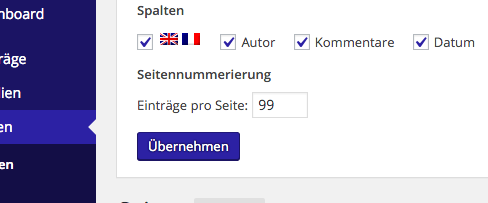
Default display posts/pages per page

Sets the entry per page user option if not set manually by the user

Bildschirmfoto 2016-03-30 um 17.31.17

function admin_default_pagecount( $per_page ) {

    $edit_per_page = 'edit_page_per_page';
    $per_page = (int) get_user_option( $edit_per_page );
    if ( empty( $per_page ) || $per_page < 1 )
        $per_page = 99;

    return $per_page;
}

add_filter( 'edit_page_per_page', 'admin_default_pagecount' );

filters: edit_post_per_page /edit_page_per_page / edit_{post type}_per_page

source: stackexchange


current admin page infos

use get_current_screen()  to get get id, actionbase, parent_base, parent_file, post_type, taxonomy of the current admin page

add_action( 'current_screen', 'this_screen' );

function this_screen() {

    $current_screen = get_current_screen();
    
    //return the id (string!) of the current screen
    return $current_screen->id;
    
}

see: fuction reference (codex)Admin Screen Reference (codex)


fix: paged WP_Query not working

  • add paged variable: [note:  for static front pages use query_var page  instead of paged ,  use is_front_page()  conditional statment if it could be both]
    $paged = (get_query_var('paged')) ? get_query_var('paged') : 1;
    
    $args = array {
      'paged' => $paged,
      // …
    }
    
    $custom_query = new WP_Query($args);


  • the post nav link expect the query object to be called $wp_query:
    ignore the next code. Don’t fuck with the $wp_query! Here’s all info one needs.

    $custom_query = new WP_Query( $args );
    
    global $wp_query;
    $tmp_query = $wp_query; // Put default query object in a temp variable
    $wp_query = null; // Now wipe it out completely
    $wp_query = $custom_query; // Re-populate the global with our custom query
    
    if ( $wp_query->have_posts() ) :
      while ( $wp_query->have_posts() ) : $wp_query->the_post();
    
      endwhile;
    endif;
    
    $wp_query = $tmp_query; // restore original wp_query 
    wp_reset_postdata(); 
    

    [source]

  • Modifying $wp_query on an archive page like home.php or category.php functions.php:
    function themename_pre_get_posts( $query ) {
        // Test for main blog posts index
        // and ensure that the query is the main query
        // and not a secondary query (such as a nav menu
        // or recent posts widget output, etc.
        if ( is_home() && $query->is_main_query() ) {
            // Modify posts per page
            $query->set( 'posts_per_page', 4 ); 
        }
    }
    add_action( 'pre_get_posts', 'themename_pre_get_posts' );